
Schema registries are critical infrastructure in event-driven architectures. They store the contracts between producers and consumers. But managing schemas through API calls alone can be fragile and hard to audit. What if you could manage your schemas the same way you manage your code?
In Apicurio Registry 3.3.0, we’re introducing GitOps storage, an experimental feature that lets you manage registry data (schemas, artifacts, groups, rules) declaratively through Git repositories. The registry becomes read-only, Git becomes the source of truth, and your team’s existing workflows (branches, pull requests, code review) become the way you manage schemas.
How It Works
One-Way Sync
Data flows in one direction: Git → Registry. The registry serves data through its REST API but rejects all write operations. All modifications happen by committing changes to Git repositories. This keeps things simple and predictable. No conflict resolution between API writes and Git state, no data drift.
The write side is intentionally open. You can use direct commits, pull requests, CI/CD pipelines, or any other Git workflow you prefer. The registry doesn’t care how changes get into Git. It just reads whatever is there.
Sidecar Architecture
The registry itself doesn’t fetch from remote Git repositories. That’s the job of a separate sidecar container. The sidecar runs the native git CLI to handle cloning, fetching, and SSH authentication, while the registry uses JGit (a Java Git library) to read repository content from a shared volume. The two containers don’t communicate directly. They’re completely decoupled through the filesystem.
Why the split? The git CLI is the canonical implementation of Git. Libraries like JGit are useful for reading Git objects in-process, but they don’t always replicate the full behavior of the real thing, particularly around SSH authentication. JGit has known SSH issues where connections can hang for hours with certain Git servers. By separating transport (sidecar with native git) from content reading (registry with JGit), we get the reliability of the canonical Git client for network operations without giving up the convenience of JGit for parsing repository content.
This design also means Git credentials (SSH keys, tokens) are only accessible to the sidecar. The registry container never sees them. We provide a pre-built sidecar image (quay.io/apicurio/apicurio-registry-gitops-sync) that supports both pull and push modes, SSH authentication, and the validation protocol used by PR checking. The operator deploys this image by default. That said, the sidecar is replaceable: if you prefer to use git-sync or your own sync mechanism, you can swap it in without changing anything on the registry side. Note that some features like PR validation depend on a file-based protocol between the registry and sidecar, so a custom sidecar would need to implement that protocol to support them.
┌───────────────────────────────────────────────────────┐
│  Kubernetes Pod                                       │
│  ┌───────────────┐        ┌────────────────────────┐  │
│  │  Sidecar      │        │  Registry Container    │  │
│  │  (git CLI)    │        │  JGit: read content    │  │
│  │  Fetches data │        │  Parse *.registry.yaml │  │
│  │  Handles auth │        │  Load into H2 database │  │
│  └──────┬────────┘        └───────────┬────────────┘  │
│         │ read/write                  │ read-only     │
│         ▼                             ▼               │
│  ┌─────────────────────────────────────────────────┐  │
│  │                 Shared Volume                   │  │
│  └─────────────────────────────────────────────────┘  │
└───────────────────────────────────────────────────────┘
Blue-Green Loading
The registry maintains two H2 in-memory databases internally. New data is always loaded into the inactive database while the active one continues serving requests without interruption. Once loading completes successfully, the databases swap atomically. Clients see a clean transition from old data to new. If loading fails (malformed YAML, missing files, rule violations), the swap simply doesn’t happen. The active database keeps serving the last known good data, and the errors are reported through logging and the management API.
This also means GitOps mode doesn’t need an external database at all. Git is the source of truth, and data is rebuilt from Git on every startup and whenever a new commit is detected. The in-memory databases are ephemeral by design. This keeps the deployment self-contained. No PostgreSQL to provision, no backups to manage. Your Git repository is the backup.
Rule Enforcement
You can configure validation rules (validity, compatibility, and integrity) at the global, group, or artifact level, and they’re enforced during loading. After all data is imported into the inactive database, a validation pass checks artifact versions against the effective rules (artifact rules override group rules, which override global rules). If any rule is violated, the load is rejected. The blue-green swap doesn’t happen, and the previous data continues being served.
For example, the production registry configuration in the example repository enforces VALIDITY: FULL and COMPATIBILITY: BACKWARD globally. If someone tries to push an Avro schema with a syntax error, or removes a required field in a new version, the registry will refuse to load the data and keep serving the previous valid state.
Controlling validation with validatedUpTo
By default, only the last version of each artifact is validated against its predecessor. This is efficient for the common case of adding new versions one at a time. But if you add multiple versions at once, or tighten rules after historical data is already in place, you may need more control.
The validatedUpTo field lets you tell the registry which versions have already been validated. Versions up to and including the specified version are skipped. After that point, each version is validated against its immediate predecessor. Here’s an example:
$type: artifact-v0
groupId: orders
artifactId: order-created
artifactType: AVRO
rules:
  - ruleType: COMPATIBILITY
    config: BACKWARD
validatedUpTo: "2.0.0"
versions:
  - version: "1.0.0"
    content: ./order-created-v1.avsc
  - version: "2.0.0"
    content: ./order-created-v2.avsc
  - version: "3.0.0"        # Validated against 2.0.0
    content: ./order-created-v3.avsc
  - version: "4.0.0"        # Validated against 3.0.0
    content: ./order-created-v4.avsc
In this case, versions 1.0.0 and 2.0.0 are skipped (they were valid under the old rules when they were first added). Versions 3.0.0 and 4.0.0 are validated as consecutive pairs. Setting validatedUpTo to the latest version skips validation entirely for that artifact, acting as an explicit opt-out.
This means you can adopt stricter rules going forward without having to retrofit all your existing schemas.
Management API
The registry exposes management endpoints at /apis/registry/v3/admin/gitops/ that report sync status, current commit SHA, load statistics, and errors. You can also trigger an immediate sync. We plan to add support for these endpoints to the Apicurio Registry CLI, which will make operational tasks and CI/CD integration even easier.
A Note on KubernetesOps Storage
Apicurio Registry also provides a KubernetesOps storage variant (apicurio.storage.kind=kubernetesops) that uses the same internal code and data format as GitOps, but stores data in Kubernetes ConfigMaps instead of a Git repository. If your organization already uses tools like Argo CD or Flux to sync Git repositories into Kubernetes resources, KubernetesOps may be the easier path, since the sync layer is handled by your existing tooling. The registry watches ConfigMaps in a single namespace (configurable, defaults to the pod’s own namespace) and loads data the same way GitOps does, with blue-green loading and rule enforcement.
The trade-off is that the registry container needs access to the Kubernetes API, and data is scoped to a single namespace. GitOps storage avoids both of these constraints by reading directly from a Git repository on a shared volume, but it’s more complex to set up.
The Data Format
File Conventions
Registry metadata files use the *.registry.yaml extension and a $type discriminator field to identify what they represent. There are three types: registry-v0 for root configuration (global rules, registry ID), group-v0 for group definitions, and artifact-v0 for artifacts with their versions. Content files (your actual schemas) are plain files (.avsc, .proto, .json, etc.) referenced from metadata files via relative paths. No special format required.
You’re free to organize files however you want. There’s no required directory structure, no mandatory naming conventions beyond the *.registry.yaml extension. Put schemas next to application code, in a dedicated schemas directory, or flat in the repo root. The registry scans for *.registry.yaml files recursively and dispatches based on $type.
Registries and Repositories: The N:M Model
One of the more powerful aspects of the data format is the many-to-many (N:M) relationship between registries and repositories. This flexibility supports different organizational patterns depending on how your teams are structured.
Single repository, multiple registries (1:N): One repository contains all your schema data, and multiple registry instances load different subsets. Each registry instance is configured with a registryId (e.g. prod, staging), and entities in the repository declare which registries should load them via a registryIds list. This gives you centralized management with per-environment control. A single PR can add a schema that’s visible in staging but not yet in production.
Multiple repositories, single registry (N:1): Each team or project keeps schemas in their own repository, and a single registry instance aggregates data from all of them. This is common when teams want to manage schemas alongside their application code but still need a unified view for consumers. See the Multi-Repository Aggregation section for details.
You can also combine both: multiple teams with separate repos feeding into multiple registry environments. The key fields are:
registryIdon aregistry-v0file: a single ID identifying this registry configuration. Must match the registry instance’sapicurio.polling-storage.idsetting.registryIdsongroup-v0andartifact-v0files: a list of registry IDs that should load this entity. If omitted or empty, the entity is loaded by all registry instances (the simple default).
A registry configuration file sets global rules and identifies which registry instance should load this data:
# config/prod.registry.yaml
$type: registry-v0
registryId: prod
globalRules:
  - ruleType: VALIDITY
    config: FULL
  - ruleType: COMPATIBILITY
    config: BACKWARD
A group definition organizes related artifacts together:
# orders/orders.registry.yaml
$type: group-v0
registryIds: [prod, staging]
groupId: orders
description: Order management service schemas
labels:
  team: platform
  domain: commerce
Example: An Avro Schema in Git
Here’s what an artifact definition looks like. This Avro schema has two versions, configured to be loaded by both the prod and staging registry instances. The rules section enforces backward compatibility between versions, and each version points to its content file via a relative path:
# orders/order-created.registry.yaml
$type: artifact-v0
registryIds: [prod, staging]
groupId: orders
artifactId: order-created
artifactType: AVRO
name: Order Created Event
description: Event emitted when a new order is placed
createdOn: "2024-01-15"
labels:
  event-type: domain-event
rules:
  - ruleType: COMPATIBILITY
    config: BACKWARD
versions:
  - version: "1.0.0"
    state: ENABLED
    description: Initial version
    createdOn: "2024-01-15"
    content: ./order-created-v1.avsc
  - version: "2.0.0"
    state: ENABLED
    description: Added customer email field
    createdOn: "2024-06-01"
    content: ./order-created-v2.avsc
The content files are standard Avro schemas, nothing registry-specific about them:
{
  "type": "record",
  "name": "OrderCreated",
  "namespace": "com.example.payments",
  "fields": [
    { "name": "orderId", "type": "string" },
    { "name": "customerId", "type": "string" },
    { "name": "totalAmount", "type": "double" },
    { "name": "currency", "type": "string", "default": "USD" },
    { "name": "createdAt", "type": { "type": "long", "logicalType": "timestamp-millis" } }
  ]
}
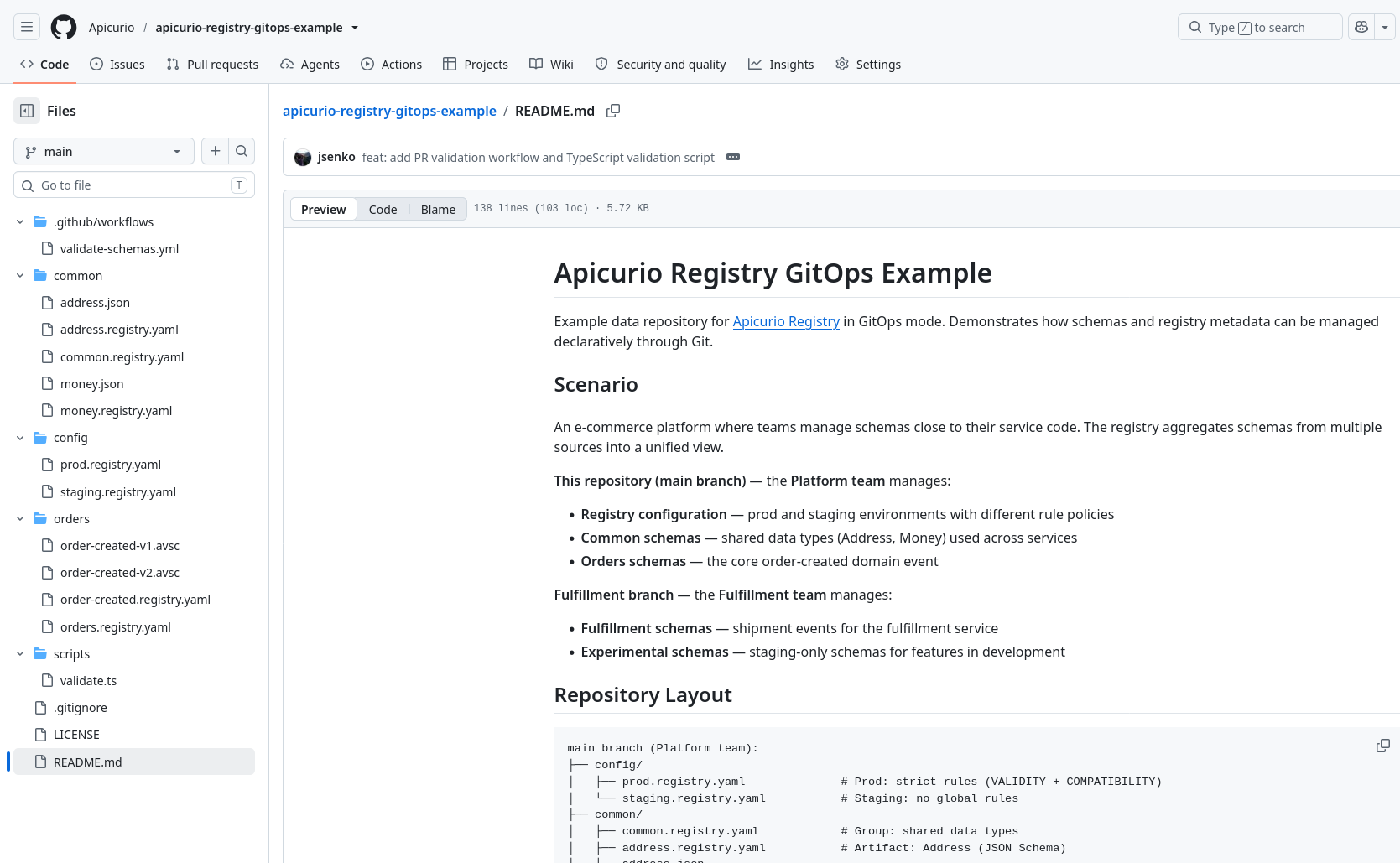
The apicurio-registry-gitops-example repository contains a complete working dataset with multiple groups, artifacts, and two registry configurations (prod and staging).
Try It Out: Docker Compose Quick Start
The quickest way to try GitOps mode is with Docker Compose. The Apicurio Registry repository includes ready-to-run examples covering several deployment scenarios.
Note: The Docker Compose files default to development snapshot images. To use the 3.3.0 release, set the image tags via environment variables:
export REGISTRY_IMAGE=quay.io/apicurio/apicurio-registry:3.3.0
export SIDECAR_IMAGE=quay.io/apicurio/apicurio-registry-gitops-sync:3.3.0
Local Volume (Simplest)
The local volume example clones the example repository and mounts it directly into the registry container. No sidecar needed.
git clone https://github.com/Apicurio/apicurio-registry.git
cd apicurio-registry/examples/gitops
docker compose up
The registry UI is available at http://localhost:8888 and the API at http://localhost:8080/apis/registry/v3.
Once the registry starts, you can check the sync status via the management API:
$ curl -s http://localhost:8080/apis/registry/v3/admin/gitops/status | jq .
{
    "syncState": "IDLE",
    "groupCount": 2,
    "artifactCount": 3,
    "versionCount": 4,
    "errors": [],
    "sources": {
        "default": "40fa540"
    }
}
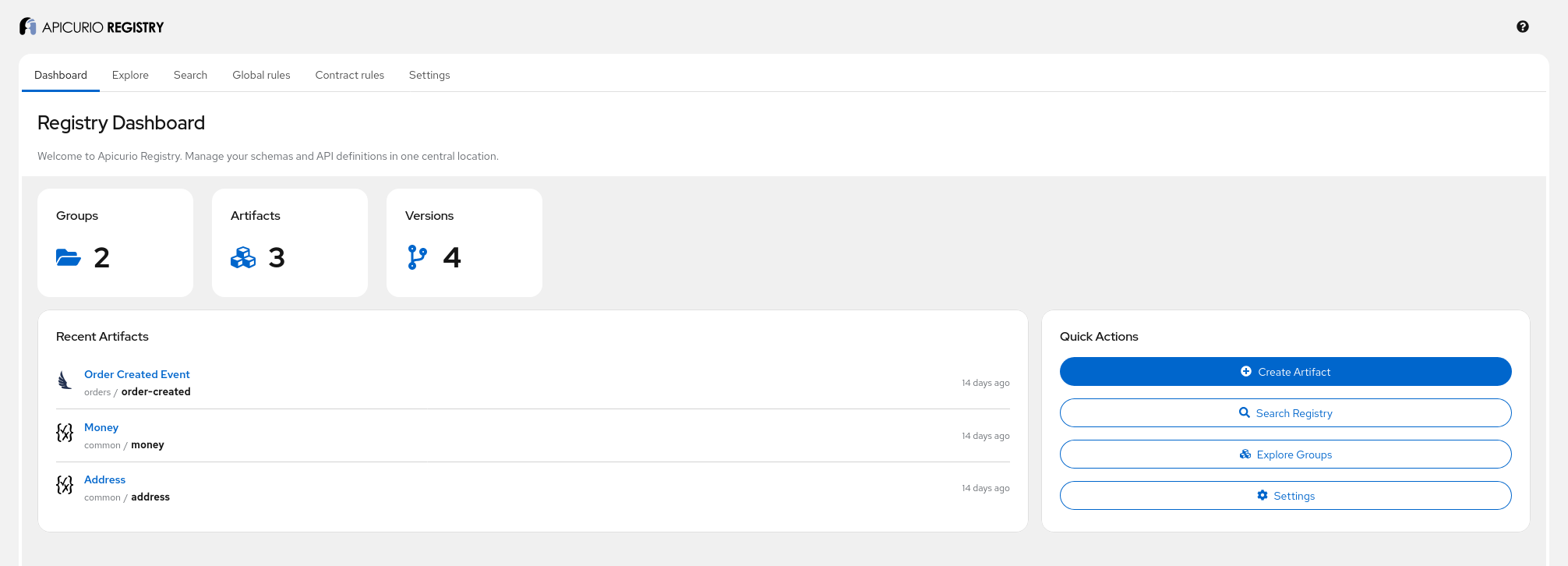
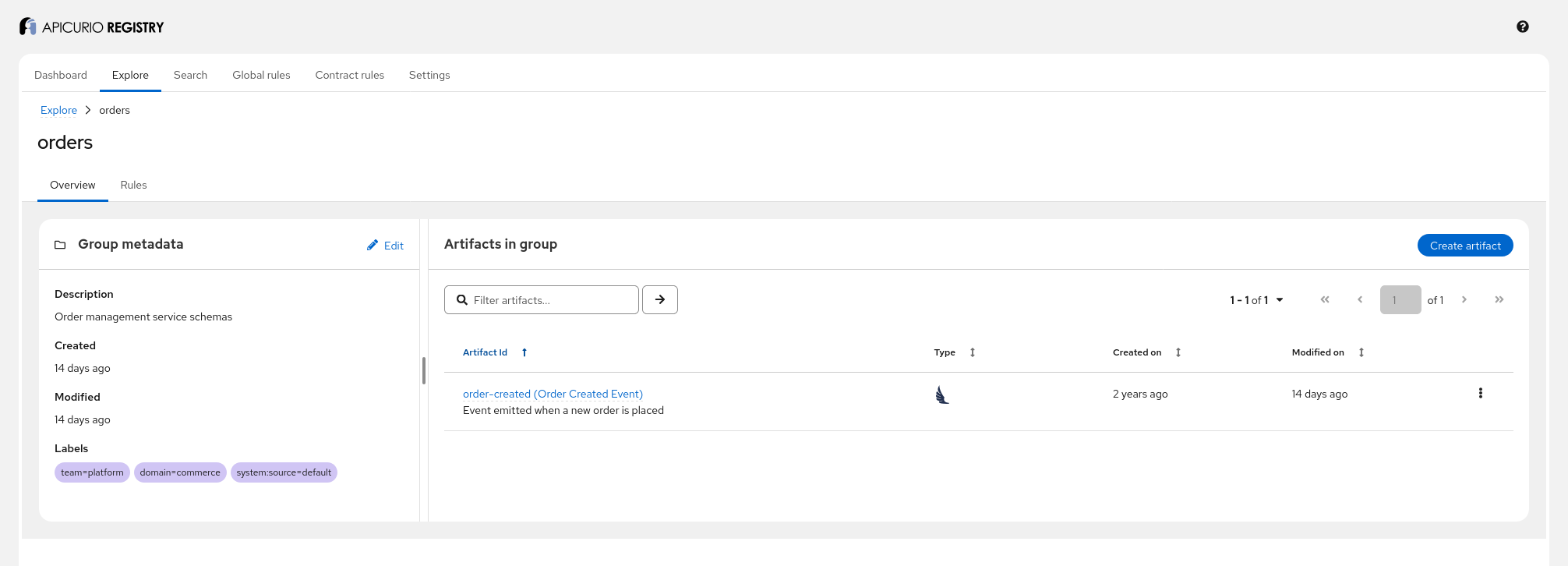
The registry loaded 2 groups (common, orders), 3 artifacts, and 4 versions from the example repository. You can modify the cloned repository under example-repo/ and the registry will pick up the changes automatically on the next poll cycle.
Pull from a Remote Repository
For a more realistic setup, use the pull-https example where the sidecar automatically fetches from a remote Git repository:
cd examples/gitops/pull-https
docker compose up
The sidecar clones the apicurio-registry-gitops-example repository from GitHub on startup and periodically fetches updates. The registry detects new commits and reloads automatically. You can point it at your own repository by setting APICURIO_GITOPS_REPO_URL.
To see the live reload in action, fork the example repository, point the sidecar at your fork, and try pushing a change. For example, add a new version to an artifact or modify a schema file, commit, and push. Within the next poll cycle (30 seconds by default), the registry will pick up the change and reload.
See the examples README for additional setups including SSH pull and push mode. Most Docker Compose examples have equivalent operator examples for Kubernetes/OpenShift deployments, and vice versa.
Multi-Repository Aggregation
In real organizations, different teams own different schemas. With GitOps mode, each team can keep schemas in their own repository, alongside the code that produces or consumes them, while a single registry instance aggregates everything into a unified view.
The multi-repo example demonstrates this with two branches simulating two team repositories:
main(Platform team): registry config, common schemas, order eventsfulfillment(Fulfillment team): shipment events, experimental schemas
cd examples/gitops/multi-repo-pull-https
docker compose up
By default, this runs the prod registry, which loads 3 groups, 4 artifacts, and 5 versions from both sources:
$ curl -s http://localhost:8080/apis/registry/v3/admin/gitops/status | jq .
{
    "syncState": "IDLE",
    "groupCount": 3,
    "artifactCount": 4,
    "versionCount": 5,
    "sources": {
        "platform": "40fa540",
        "fulfillment": "73e8cce"
    }
}
To run as the staging registry and see the experimental schemas too:
APICURIO_POLLING_STORAGE_ID=staging docker compose up
Staging loads 4 groups, 5 artifacts, and 6 versions. The extra group and artifact are the experimental schemas from the fulfillment branch, tagged with registryIds: [staging] so they only appear in the staging environment.
The registry automatically adds a system:source label to every group and artifact, indicating which repository it came from. This makes it easy to tell which team or repo owns a given schema when browsing the unified view. The label key is configurable via apicurio.polling-storage.source-label-key.
If two repositories define the same artifact (same groupId + artifactId), the load is rejected. The registry keeps serving the last known good data and reports the conflict through logging and the management API. No silent overwrites, no priority-based resolution. Just a clear error.
Multi-Environment Promotion
Different registry instances can point to different branches of the same repository:
devbranch → Development Registrystagingbranch → Staging Registrymainbranch → Production Registry
Schema promotion becomes a Git merge. Within a single branch, registryIds lists provide even finer control. For example, experimental schemas can be tagged with registryIds: [staging] so they appear in staging but not production, even when both environments read from the same branch.
Kubernetes Operator Support
The Apicurio Registry operator makes GitOps deployment straightforward. Set storage.type: gitops in the custom resource, and the operator handles the rest: sidecar injection, shared volume creation, environment variable configuration, and SSH secret mounting.
For production deployments, we recommend installing the operator via OLM (Operator Lifecycle Manager). The upstream operator is available in the OperatorHub catalog, and a Red Hat-built version is available in the OpenShift Marketplace. For quick testing, you can install the operator directly from the install YAML:
# Replace <namespace> with your target namespace
curl -sL https://raw.githubusercontent.com/Apicurio/apicurio-registry/main/operator/install/apicurio-registry-operator-3.3.0.yaml \
  | sed "s/PLACEHOLDER_NAMESPACE/<namespace>/g" \
  | kubectl apply -f -
An archive containing the install YAML and operator examples is also attached to each GitHub release.
Pull Mode (HTTPS)
The simplest operator deployment pulls from a public Git repository:
apiVersion: registry.apicur.io/v1
kind: ApicurioRegistry3
metadata:
  name: gitops-pull-https
spec:
  app:
    storage:
      type: gitops
      gitops:
        repos:
          - url: https://github.com/Apicurio/apicurio-registry-gitops-example.git
        registryId: prod
kubectl apply -f example-pull-https.yaml
The operator creates a deployment with two containers (registry + sidecar), a shared volume, and configures all the environment variables. Within a minute, the registry loads data from the example repository:
$ curl -s http://<registry-host>/apis/registry/v3/admin/gitops/status
{
    "syncState": "IDLE",
    "groupCount": 2,
    "artifactCount": 3,
    "versionCount": 4,
    "errors": [],
    "sources": { "default": "40fa540" }
}
For private repositories, SSH keys are configured via secretRef fields. The operator handles volume mounting automatically:
gitops:
  repos:
    - url: git@github.com:my-org/my-schemas.git
  pull:
    sshKeys:
      name: my-ssh-keys      # Secret name
      key: id_ed25519        # Key within the Secret (default: id_ed25519)
Each secretRef points to a single key within a Kubernetes Secret. The Secret value should contain the raw file content. For pull.sshKeys, that’s a PEM-encoded private key. For push.authorizedKeys, it’s a standard OpenSSH authorized_keys file (one public key per line, so multiple users can push). For additional SSH secrets (pull.knownHosts, push.hostKey), see the operator examples.
Push Mode (SSH)
For environments without outbound Git access, the operator can deploy the sidecar in push mode with an SSH server:
apiVersion: registry.apicur.io/v1
kind: ApicurioRegistry3
metadata:
  name: gitops-push
spec:
  app:
    storage:
      type: gitops
      gitops:
        mode: push
        registryId: prod
        push:
          authorizedKeys:
            name: gitops-push-authorized-keys
            key: authorized_keys
Before deploying, generate an SSH key pair and create a Secret with the public key:
ssh-keygen -t ed25519 -f id_ed25519 -N ""
kubectl create secret generic gitops-push-authorized-keys \
  --from-file=authorized_keys=id_ed25519.pub
kubectl apply -f example-push.yaml
The operator automatically creates an SSH service on port 2222. To push data, forward the port and push from a local clone of the example repository:
kubectl port-forward svc/gitops-push-gitops-ssh-service 2222:2222 &

git clone https://github.com/Apicurio/apicurio-registry-gitops-example.git schemas
cd schemas
export GIT_SSH_COMMAND="ssh -o StrictHostKeyChecking=no -i /path/to/id_ed25519"
git remote add registry ssh://git@localhost:2222/repos/default
git push registry main
The registry detects the new data on the next poll cycle and loads it automatically.
In production, expose the SSH service via a LoadBalancer Service (on cloud providers) or let an in-cluster CI/CD pipeline (e.g. Tekton) reach it directly via the ClusterIP. For production push scenarios, consider deploying a full Git hosting solution (Gitea, GitLab) in the cluster instead of using the built-in SSH server.
See the operator GitOps examples for all supported scenarios including multi-repo and local volume deployments.
PR Validation: Catching Errors Before They Reach Production
One of the most powerful features of managing schemas through Git is the ability to validate changes before they’re merged. We’ve built a dry-run validation capability that integrates with your CI/CD pipeline. Think of it as a schema validator that checks changes against the live registry’s rules and state.
How It Works
When a pull request modifies schema files, your CI pipeline can call the registry’s validation API:
- CI calls
POST /apis/registry/v3/admin/gitops/validatewith the PR branch name - The sidecar fetches the PR branch and checks it out
- The registry loads the data into its inactive storage and runs the full validation pipeline: parsing, rule enforcement (COMPATIBILITY, VALIDITY, INTEGRITY), conflict detection
- CI polls
GET /apis/registry/v3/admin/gitops/validate/{taskId}until complete - The result (pass/fail with detailed errors) is reported back to the PR
The live registry is never affected. Validation uses the inactive blue-green database, and no swap happens.
Note that validation relies on a simple file-based protocol between the registry and the sidecar. This protocol is implemented in the provided apicurio-registry-gitops-sync sidecar image. If you use a custom sidecar (e.g. git-sync), PR validation will not be available unless you implement this protocol separately.
GitHub Actions Example
The apicurio-registry-gitops-example repository includes a ready-to-use GitHub Actions workflow that implements this flow:
# .github/workflows/validate-schemas.yml (simplified)
name: Validate Schemas
on:
  pull_request:
    paths: ['**/*.registry.yaml', '**/*.avsc', '**/*.json', '**/*.proto']

jobs:
  validate:
    runs-on: ubuntu-latest
    steps:
      - uses: actions/checkout@v4
      - name: Validate schemas
        env:
          REGISTRY_URL: ${{ vars.REGISTRY_URL }}
          REGISTRY_REF: ${{ github.head_ref }}
        run: npx tsx scripts/validate.ts
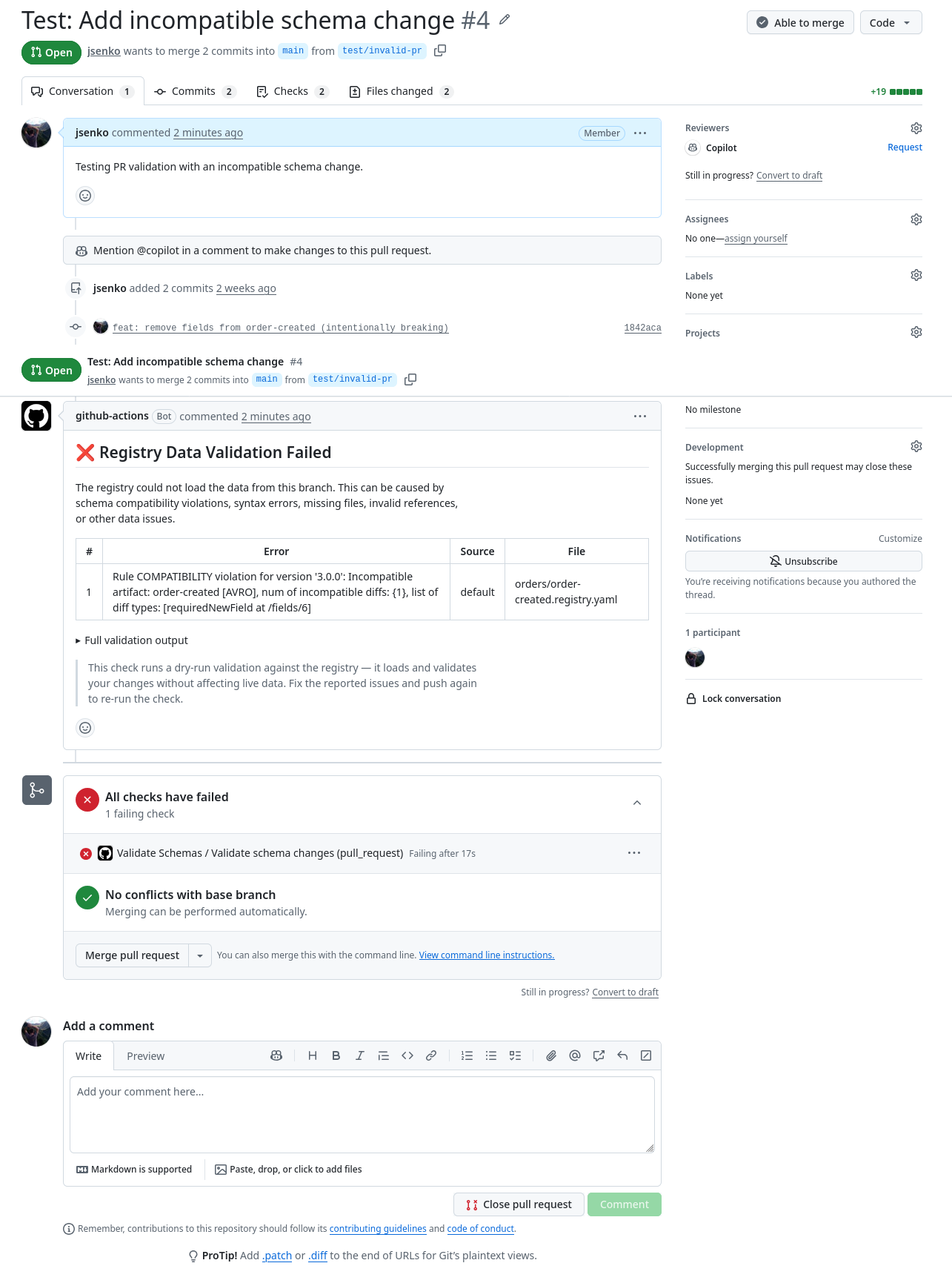
The validation script calls the registry API, polls for results, and exits with a non-zero code on failure, at which point the workflow posts a comment on the PR with the specific errors: which file, which rule was violated, and why.
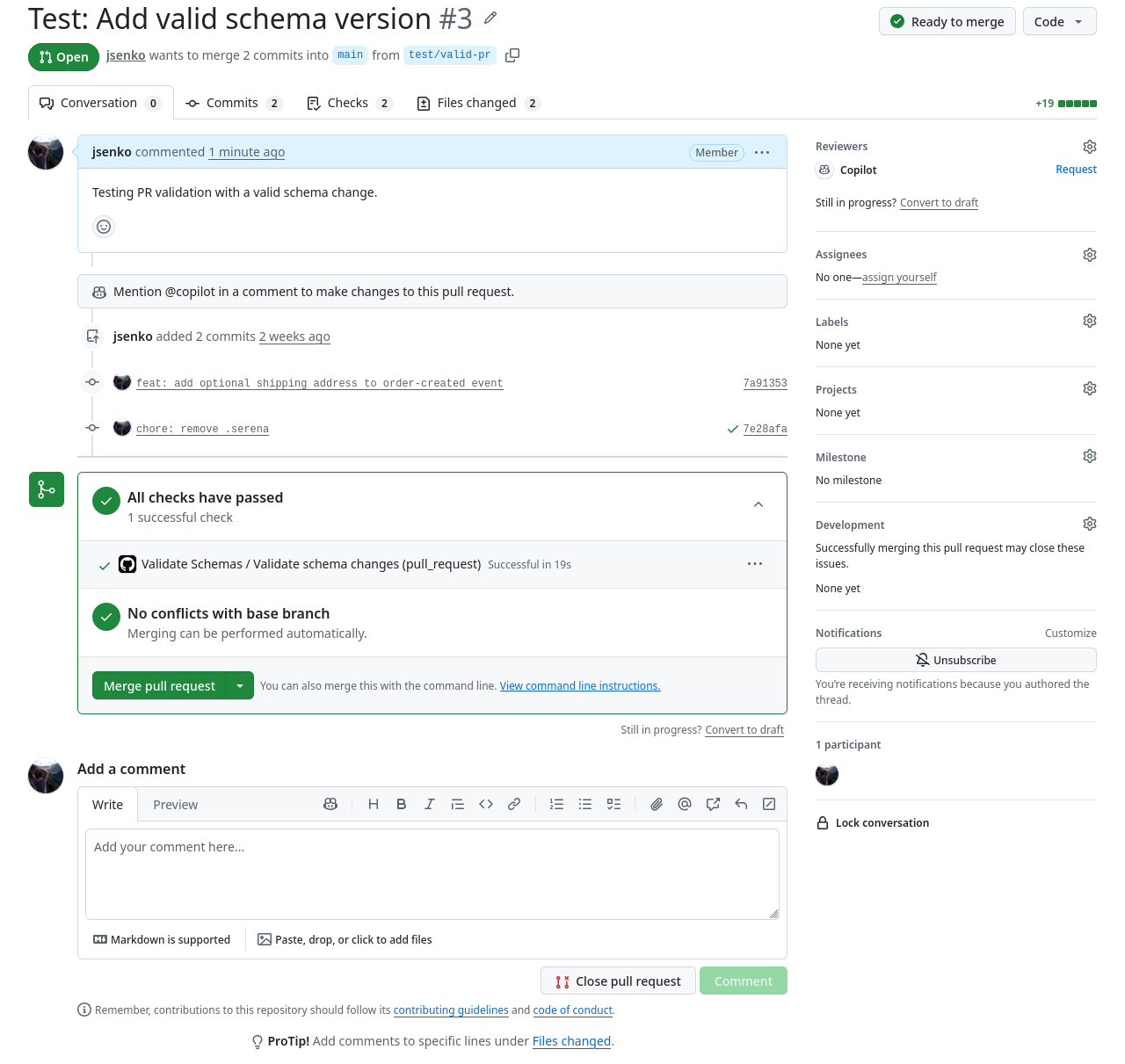
To try this yourself, fork the example repository and configure the REGISTRY_URL variable in your fork’s settings (Settings > Secrets and variables > Actions > Variables) to point at your registry instance. The repository includes test/valid-pr and test/invalid-pr branches you can use to create test PRs.
Here’s what the validation API returns for a successful check (a new backward-compatible schema version):
{
    "taskId": "d72e2720e3ec",
    "state": "completed",
    "result": "success",
    "groupCount": 2,
    "artifactCount": 3,
    "versionCount": 5,
    "errors": []
}
And for a failing check (an incompatible schema change that adds a required field without a default):
{
    "taskId": "9c00c9a7f39d",
    "state": "completed",
    "result": "failure",
    "errors": [
        {
            "detail": "Rule COMPATIBILITY violation for version '3.0.0': Incompatible artifact: order-created [AVRO], num of incompatible diffs: {1}, list of diff types: [requiredNewField at /fields/6]",
            "source": "default",
            "context": "orders/order-created.registry.yaml"
        }
    ]
}
The error tells you exactly what went wrong: a COMPATIBILITY rule violation in orders/order-created.registry.yaml, version 3.0.0, because a new required field was added without a default value.
Pull and Push Models
The volume-based architecture supports two deployment models. You choose based on your network environment, and both can even be mixed in a multi-repo setup (one repo pulling, another accepting pushes).
Pull Model (Default)
The sidecar periodically fetches from a remote Git repository using git fetch. This is the standard approach and works with any Git hosting (GitHub, GitLab, Bitbucket, self-hosted). The sidecar clones on startup and runs a fetch loop at a configurable interval (default: 30 seconds).
┌──────────────┐                ┌──────────┐               ┌──────────┐
│ Remote Git   │  git fetch     │ Sidecar  │   read/write  │ Registry │
│ Repo         │ ◄───────────── │ (git CLI)│ ────────────► │ (JGit)   │
│ (GitHub,     │                │          │               │          │
│  GitLab...)  │                └──────────┘               └──────────┘
└──────────────┘                      │                          │
                                      ▼                          ▼
                               ┌─────────────────────────────────────┐
                               │           Shared Volume             │
                               └─────────────────────────────────────┘
See the pull-https and pull-ssh examples.
Push Model (Restricted Networks)
In environments where outbound network access is restricted (air-gapped clusters, strict firewall policies), the sidecar can run an SSH server that accepts git push directly. An external process (CI/CD pipeline, developer workstation, or another cluster) pushes changes to the in-cluster repository.
┌──────────────┐                ┌──────────┐               ┌──────────┐
│ CI/CD or     │  git push      │ Sidecar  │   read/write  │ Registry │
│ External     │ ──────────────►│ (SSH     │ ────────────► │ (JGit)   │
│ Process      │                │  server) │               │          │
└──────────────┘                └──────────┘               └──────────┘
                                      │                          │
                                      ▼                          ▼
                               ┌─────────────────────────────────────┐
                               │           Shared Volume             │
                               └─────────────────────────────────────┘
# From your CI pipeline or local machine
export GIT_SSH_COMMAND="ssh -i /path/to/key -p 2222"
git remote add registry git@registry-host:/repos/default
git push registry main
See the push example for a complete setup.
Security
The sidecar handles Git credentials and, in push mode, exposes an SSH server.
Security Levels
The sidecar supports two security levels, controlled by APICURIO_GITOPS_SECURITY:
strict(default): all credentials must be explicitly provided. The sidecar fails fast on any missing or misconfigured security material. SSH known_hosts is required for pull mode, and host keys and authorized_keys are required for push mode.dev: auto-generates SSH host keys, uses trust-on-first-use (TOFU) for SSH host verification, and warns on issues instead of failing. Use this for local development and testing only.
Credential Isolation
Git credentials (SSH keys, tokens) are only accessible to the sidecar container. The registry container mounts the shared volume read-only and never has access to credentials. In Kubernetes, SSH keys are mounted from Secrets and copied to the sidecar’s ~/.ssh/ directory with strict permissions (0600).
Push Mode Hardening
The push mode SSH server is hardened by default:
- Password and keyboard-interactive authentication are disabled (key-only)
- The
gituser’s shell is restricted togit-shell(no general shell access) - TCP forwarding, agent forwarding, and tunneling are all disabled
- Connection rate limiting via OpenSSH directives (
MaxAuthTries,LoginGraceTime,MaxStartups) - Non-standard port (default: 2222)
For production push deployments, we recommend using an existing Git hosting solution (Gitea, GitLab) in the cluster instead of the built-in SSH server.
Log Sanitization
The sidecar sanitizes HTTPS URLs before logging, replacing any embedded credentials (e.g. https://token@github.com/...) with https://***@github.com/.... SSH key contents are never logged.
For the full threat model and detailed security recommendations, see the GitOps Sync Container README.
Current Limitations and What’s Next
GitOps storage is an experimental feature in 3.3.0. As with all experimental features in Apicurio Registry, you need to set apicurio.features.experimental.enabled=true (or APICURIO_FEATURES_EXPERIMENTAL_ENABLED=true as an environment variable) to enable it. The data format uses v0 type identifiers (registry-v0, group-v0, artifact-v0) and may change in future releases. We recommend trying it out for non-critical workloads and giving us feedback. Your input will directly shape how this feature evolves.
Here’s what we’re planning next:
- CLI validator: offline validation of schema files without a running registry, integrated into the Apicurio Registry CLI
- Management API in the CLI: making operational tasks and PR checks easier from the command line
- Per-file Git history timestamps: deriving
createdOn/modifiedOnfromgit log - Multi-replica synchronization: coordinated database swaps across replicas
- GitOps-compatible export: migrate from a SQL-backed registry to GitOps mode
We’d love to hear from you. Try it out, open issues for bugs or feature requests, and let us know what additional features would make GitOps mode production-ready for your use case.